
The Lab Plan
After you start a generation, the assistant doesn’t build the whole lab in one shot. It works plan-first and chapter by chapter: it drafts a roadmap, you approve it, then it plans and builds each chapter in turn while you review the result before it moves on. This page explains that flow and why it works this way.
The generation timeline
Section titled “The generation timeline”A horizontal timeline runs across the top of the assistant, showing where the generation is:
- Lab plan — the overall roadmap of chapters.
- One segment per chapter — each chapter is planned and then built.
- Done — the lab is fully generated.

Each step on the timeline shows its state at a glance:
- Upcoming — not started yet.
- In progress — the assistant is actively working on it.
- Awaiting you — the assistant has finished and needs your review to continue.
- Complete — reviewed and done.
You can click any step that’s in progress, awaiting you, or complete to jump to it. The step that’s awaiting you is always where your attention is needed next.
The plan view
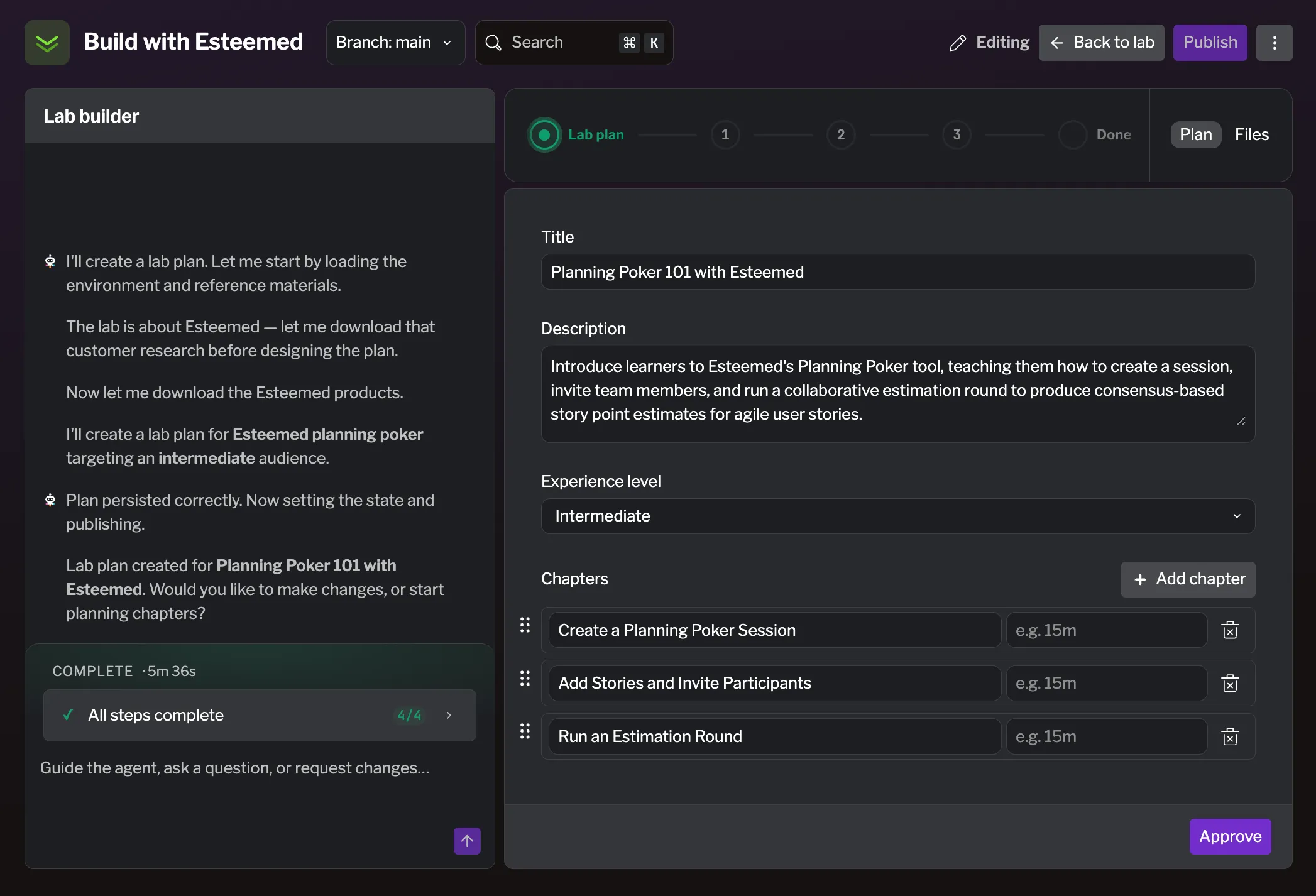
Section titled “The plan view”The right side of the assistant shows the Plan view (you can switch it to Files — see Working with the assistant). The plan is fully editable between steps, so you can shape the lab before the assistant builds it.
Reviewing the roadmap
Section titled “Reviewing the roadmap”When the roadmap is ready, the plan view shows the lab’s title, description, and experience level, followed by the list of chapters. Each chapter has a title, a time estimate, and a goal. You can:
- Edit the title, description, and experience level.
- Edit, reorder, add (Add chapter), or remove chapters.
When you’re happy with the roadmap, click Approve to lock it in and let the assistant start on the first chapter. If you edited the roadmap, the button saves your changes as it approves.
Planning and building each chapter
Section titled “Planning and building each chapter”For each chapter the assistant works in two phases, both shown on the timeline:
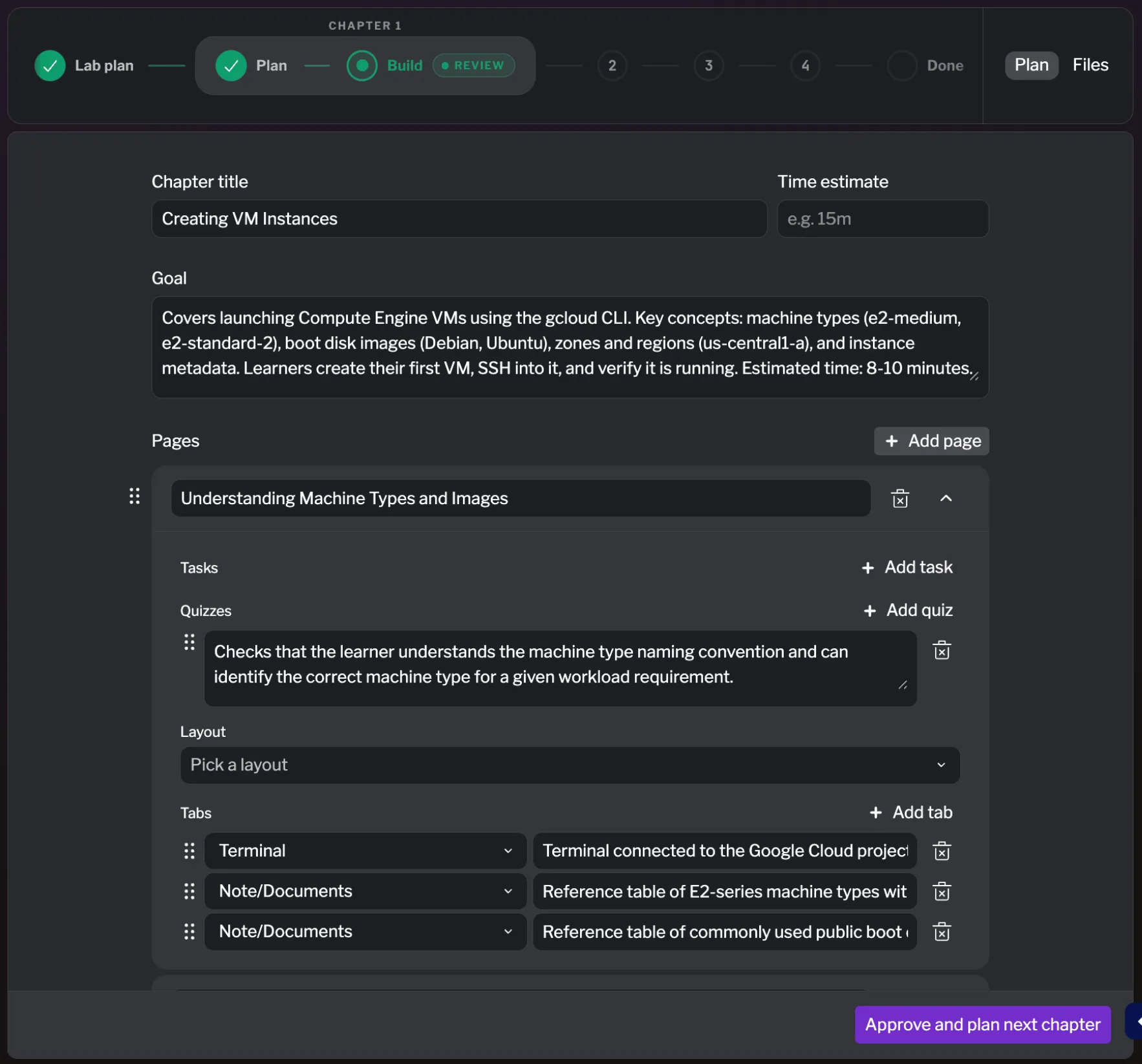
- Plan — the assistant designs the chapter: its pages, and the tasks, quizzes, and tabs on them. When it’s ready, you review and edit the chapter plan, then click Approve & Build to have it generate the content.
- Build — the assistant generates the actual lab content for the chapter. When it finishes, you review the result and click Approve and plan next chapter to continue — or, on the last chapter, Approve to finish.
The assistant repeats this plan → approve → build → approve cycle for every chapter until the whole lab is generated and the timeline reaches Done.
Why it works this way
Section titled “Why it works this way”Building a lab in reviewable stages is a deliberate design choice:
- You stay in control. Nothing is generated without your approval of the plan behind it. You decide the shape of the lab before the assistant writes a word of content.
- You catch issues early. Reviewing chapter by chapter means you can course-correct after the first chapter instead of discovering a wrong assumption after the whole lab is built. Early corrections don’t compound.
- Progress is always visible. The timeline makes it clear what’s done, what’s running, and what needs you — so a long generation never feels like a black box.